How an LLM Works

About This Guide
AI is quickly becoming an integral part of everything. This guide was written to teach the author (and any other curious party) the underlying concepts and structure involved so we can navigate the minefield of noise that exists around this topic.
It's a long guide. Every guide on this topic is going to be a long guide. These are nontrivial concepts that require a lot of backstory to really understand, and lots of backstory is how I roll :)
Full Disclosure
This guide was written with the help of AI (not by AI), specifically several different models like Gemma and Qwen running locally on my computer as well as a paid sub to Claude.
None of it is copy-pasted or generated — these are my words. The cover image though? Totally generated.
Much of this guide was fact-checked, researched, and brainstormed using these models (and then verified against other sources). If you find any errors, please let me know in the comments. Another guide on "how to write with AI as a partner" is in the works where I'll let you know what my whole setup is like.
Intro and Overview
An LLM (Large Language Model) is a type of AI model that processes natural language. We can feed a variety of different inputs into it (usually text, but increasingly other types like images, sounds, etc), it makes a bunch of connections based on the inputs, and returns an output, which is typically a bunch of intelligible and relevant text.
These models are inspired by the neural structure of the human brain. Rather than just creating a super database of information, an AI model is a massive network of mathematical "neurons" organized into layers. It's essentially a high speed connection engine. When we put something in, it analyzes the whole thing at once, forms connections between what we dropped in to "understand" it, "thinks" about what we want, weighs the importance of the different concepts, and then generates net-new text to give us an answer (rather than just pre-programmed responses).
Pretty amazing, really.
There are open source models freely available to the general public, and closed-source ones that are used for commercial and private applications. There's also two different ways we can access a model — we can run it locally or access a cloud-hosted version.
Now all this isn't as simple as it sounds... this whole thing creates a giant glossary of new terms and concepts that we as interested humans have to contend with, but hopefully after doing this deep dive, we'll have a better understanding of how these things work and what we need to consider when choosing one.
Part I: Core Concepts | I. core concepts
Parameters
At the core, an AI model is a whole bunch (now billions, soon trillions) of numerical values called parameters. These are numerical values that come in a few different varieties that form a network structure and assign strengths to the connections between them.
The number of parameters is what we use to determine the "size" of the model. As of this writing, a small model has 1-10 billion parameters, a medium one has 10-100 billion, and a large one is 100+ billion. When we go to pick out a model, we'll see numbers like 9b, 120b, etc — that's what that means.
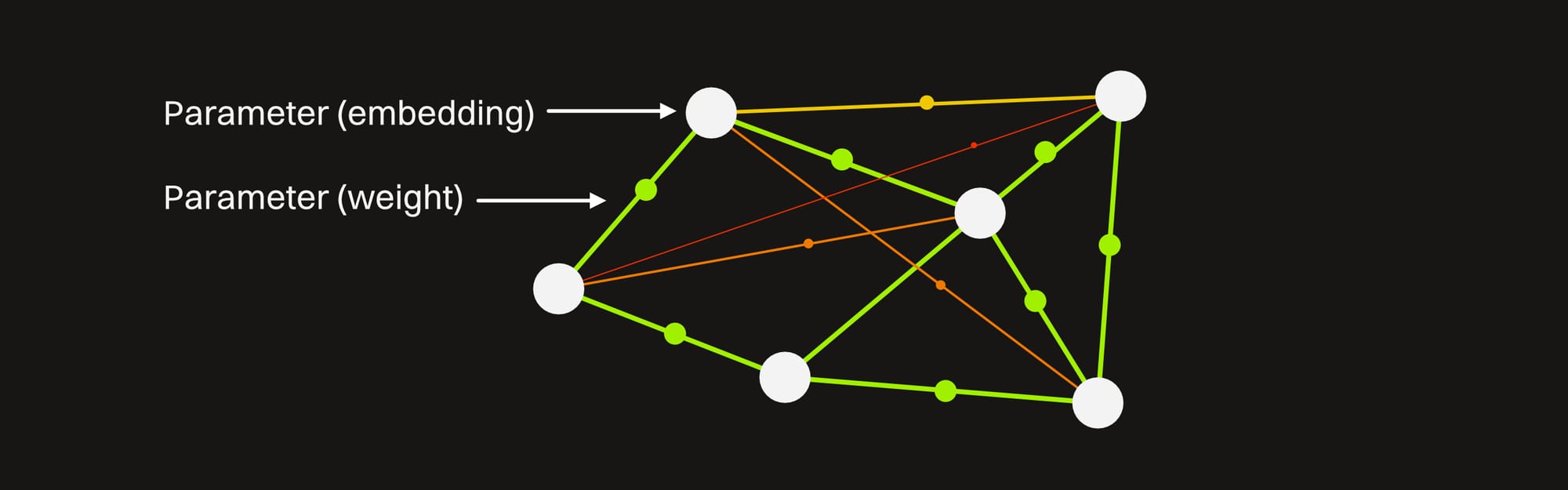
Parameters come in a few flavors — the two main ones are embeddings and weights:
Embeddings are just raw numbers that are mapped to information like words. The interesting thing here is how they're arranged — similar words are mapped to similar numbers so the model can quickly understand that two words like "big" and "large" are related without having to explicitly be told.
Weights are values that determine how strong the connections are between embeddings.
There are also biases, normalization parameters, and learned positional embeddings, but that's all too nerdy for this guide.
Analogy time!
No, not some nonsensical generated one, a real old-school one :)
This is similar to how our brains work. We can instantly associate "stone" with "hard," and there is usually a strong connection there. We can recall this quickly and know what to reasonably expect when we encounter the word "stone."
However, we do not associate "stone" with "speaking." That connection is much weaker, and we have to make more contextual leaps to understand how those two terms might work together.
An AI operates like this, only numerically. In most models, there is a high numerical value (a strong connection) between "stone" and "hard," and a low numerical value (a weak connection) between "stone" and "sing." Unless we are specifically asking about The Rolling Stones or "singing stone," the odds of the model spontaneously generating the word "sing" in a response about stone are very low.
Training
Parameters are created, adjusted, and eventually fixed during the initial setup phase of the model which is known as training. It's possible to train our own models, but it's time consuming and resource intensive to create a good one. Vast amounts of well-formatted and curated data is needed to do this right, which is why it's usually large organizations that make them from scratch.
Once the base training is done, the model is further fine-tuned to influence its behavior. This accomplishes a few things — it can make the model more of a specialist in one area than a generalist, and it can also add some guardrails and guidelines to it so it doesn't do things like cause harm (this is known as "alignment"). This often involves humans rating responses to teach the model what 'good' looks like, which is why Claude feels different from Gemini even if they're similar in size.
After a model is trained, a state of it is frozen in time and is released for people to use. At this point the parameters can no longer be adjusted unless further training occurs (in which case it's no longer technically the same model). The model also now has what's called a knowledge cut-off, so models released in 2024 won't be aware of things that have changed since then (without outside help, which we'll cover later).
The larger the model (the more parameters it has), the more concepts and connections it has, and the "smarter" it seems overall about a broad number of things. This also means the more space it takes up and the more hardware resources it consumes while running.
Models like GPT, Gemini Pro, and Claude Opus are extremely large (500B+ parameter), well-trained generalists that have to be run on server infrastructure (which is why we pay by the month to use them rather than run them locally).
The largest models that can run on a high end personal computer right now are 70-120B parameter ones like GPT-OSS, Qwen, and Mistral.
There are plenty of other metrics and optimization strategies that determine which model is right for our needs, but the size is typically a good starting point.
Tokens
A token is a basic unit of information that a model processes.
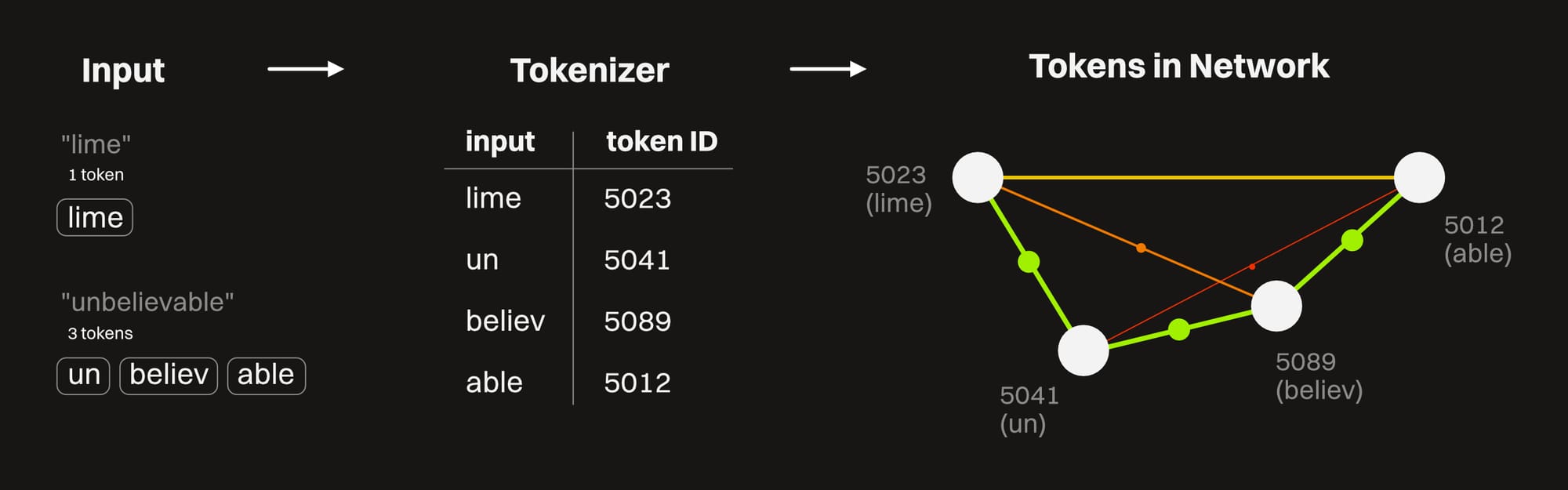
Everything that we feed into an LLM (text, images, sound, etc) is broken down into small, manageable chunks that get run through the model. This is called tokenization, and it occurs up front by a small component called a tokenizer that maps words and other inputs to a numerical format the model can work with.
The quality of the tokenizer has a big impact on the output of the model — a poor one will "translate" the intention of the input poorly, and garbage in, garbage out, right?
The tokens are mapped to parameters in the network, so the model can see how they relate to one another, and then using the weights between the parameters, it can tell how important the connections are, and pull other strong connections.
The model then starts generating output by predicting the most likely next token based on all the context it has, and outputs a series of tokens — one at a time — that then go through the reverse of this process to give us coherent natural language output. Each token in the sequence is influenced by the one before it, which is why responses are streamed in rather than just instantly appear. It's also why compound errors can occur, especially in less advanced models that don't have built-in error checking (we'll look at this soon too.)
For example, if we feed in the word "lime", it stays as a single token as it moves through the system because it's short enough. When the word "Unbelievable" is fed in, it breaks it down into "un", "believ", and "able" — three tokens. The model is aware of what a prefix, a root, and a suffix is, so it can use these concepts to understand larger words rather than having to memorize every possible long word. When the processing is done, it spits out whatever it is we asked about the lime into a long string of tokens that are "translated" back into a few lines of text that say something like "A lime is a citrus fruit that's green in color. It may seem unbelievable, but it's true that limes sink while lemons float".
Similarly, when we feed an image in, it breaks it down into smaller tiles, each of which fit in a token. A large image consumes more tokens than a smaller one (though reducing an image too much will cause the model to not be able to make out details).
The general rule of thumb is that 1,000 tokens is equal to 750 words.
The more tokens that are involved with any interaction (both input and output), the more processing power it takes — which equates to hitting usage limits and costing more on a pay-per-use hosted model, or using more energy and taking more time on a local model.
Some models are better than others at tokenizing different types of information. This makes them faster, more efficient, and more accurate for a particular type of input or output.
How Models Reason
So it's not just the size of the model, the quality of the connections, and the quality of the training that produces good results — it's also what the model actually does with all this. "Reasoning" is how we refer to the model's method of working through a problem. As of right now, it can be broken down into four levels, all of which build on one another.
1: Prediction
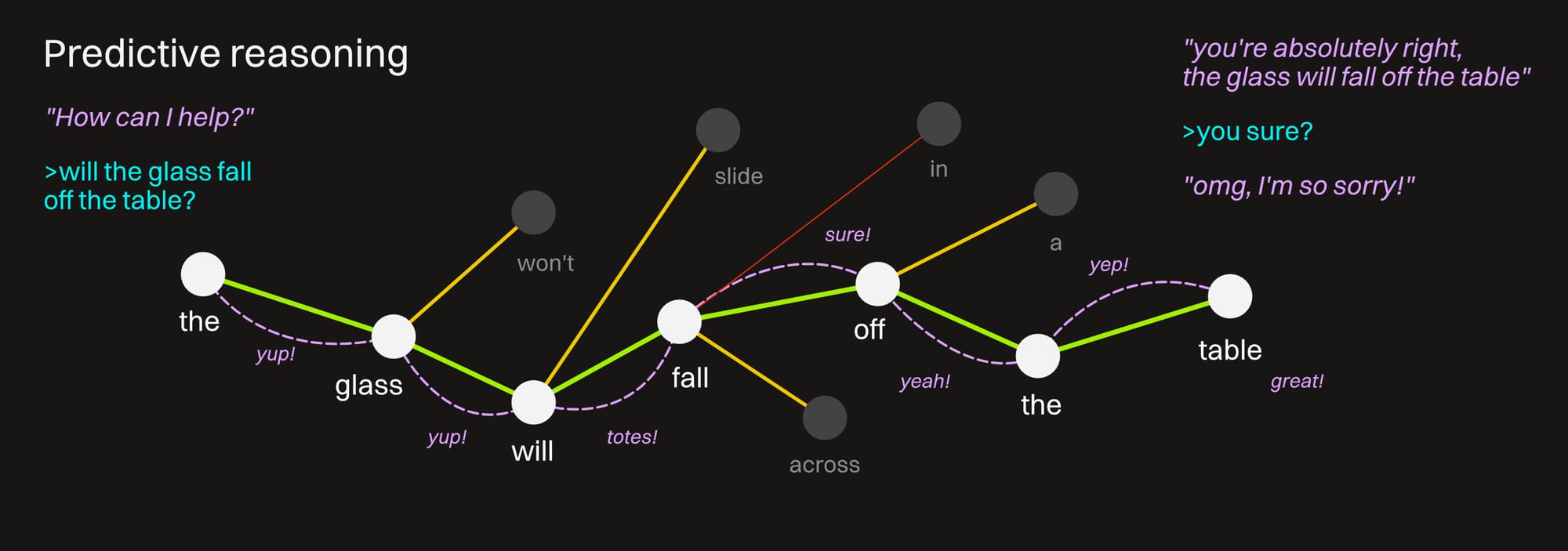
Prediction is the core way every model reasons. It's what makes it an AI, and not just an advanced database search tool. It basically looks at what we input, and then seeks out the strongest common connections it can make and follows a linear path to give back an answer as quickly and efficiently as possible.
Regardless of whether it's correct or not.
Predictive reasoning relies primarily on the internal weights, and if the model picks a path based on this, it sticks to it without much if any error checking. If it doesn't know something or can't quickly make a connection, it just finds another connection that seems to fit.
The longer a model stays on a purely predictive train of reasoning, the more error prone it gets. A bad/weird connection goes to another bad/weird connection, and it starts to do what's called "hallucinating."
That said, these patterns are pretty good, and what the models return do make sense (it's not gibberish), but they have a very high margin of error when dealing with things that aren't very common and agreed-upon (follow a tried and true pattern).
Interaction with simple prediction-only models can help us work out what we're thinking and give us ideas we haven't considered, but none of this should ever be taken as fact.
2: Thinking
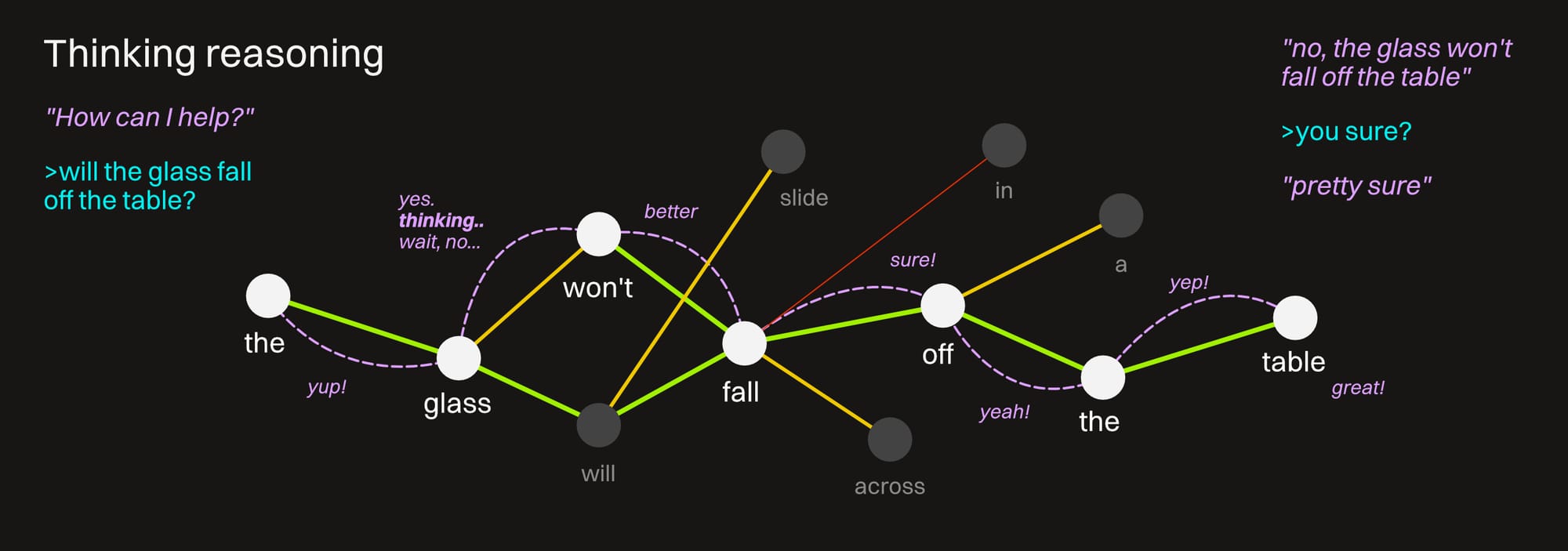
Thinking is a type of reasoning in more advanced models that helps them avoid guessing as much based on statistical patterns and forces a more logical path through the problem it's given.
It does this by setting up a series of intermediate steps between the initial input and the final output. This builds in error-checking, breaks complex problems into smaller chunks, and results in far better accuracy than just pure predictive guesswork.
In systems that make this visible, when we see light gray or italic text spring up as we're waiting for an answer that says things like "why did the user ask this?", or "the tone seems professional", or "wait, but the user tried this...", this is thinking in action. Making the model second-guess itself and consider more paths before picking the correct one is closer to how most humans think :D
The tradeoff? Resources! It costs more processing time to do this which equates to more energy required, more tokens required, more time between answers, and hitting our limits in Claude using Opus on the $20 plan with a single question.
3: Simulation
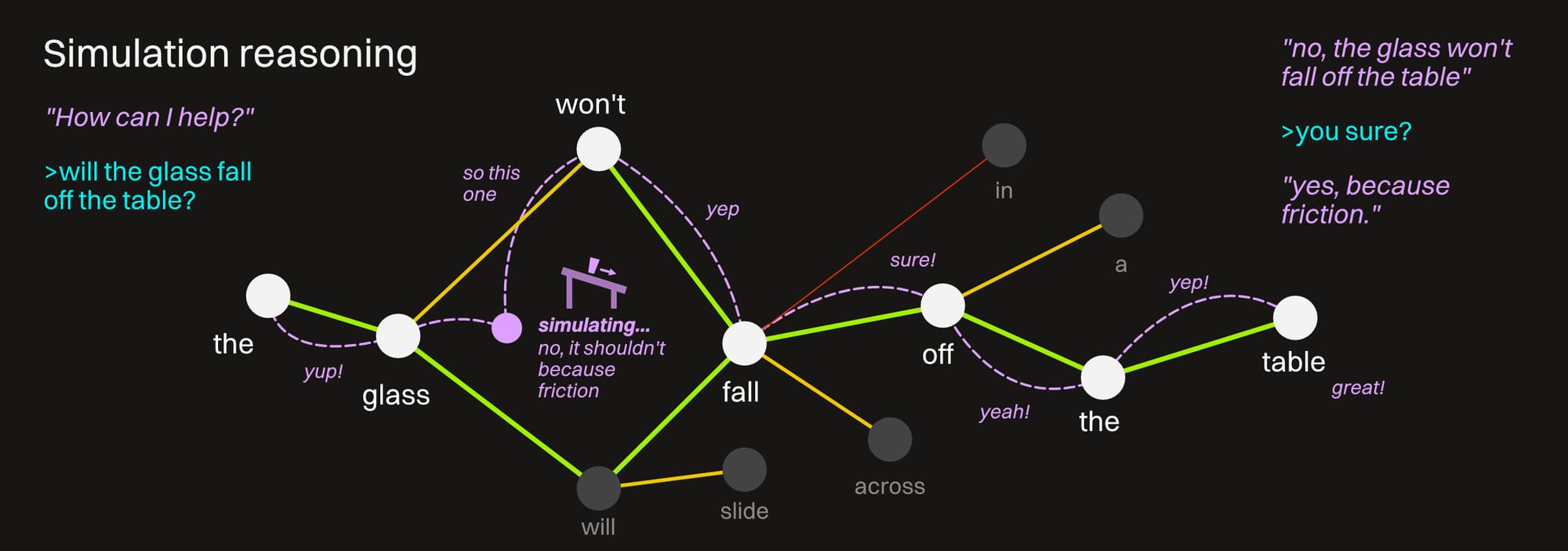
This is starting to get out of the scope of this guide, but it's an emerging trend right now, so we should at least touch on it. "World Models" are trained on video and physical data to understand space, time, and gravity. This gives the model the ability to imagine physical reactions and give relevant commentary on them.
This means if we ask it something like "will my ceramic vase slide off the table if it's on uneven ground", it won't just hunt for the fastest set of connections and deliver an answer based just on prediction. It also won't just try a whole bunch of connections until it comes up with the best sounding one. It'll have the ability to "imagine" the scenario and use that to inform a much better answer.
The tradeoff? None!... no, wait... thinking... ah, resources. Right, it's always resources. Sims are taxing, requires burning more tokens, needs better hardware... we get the drift.
4: Verification
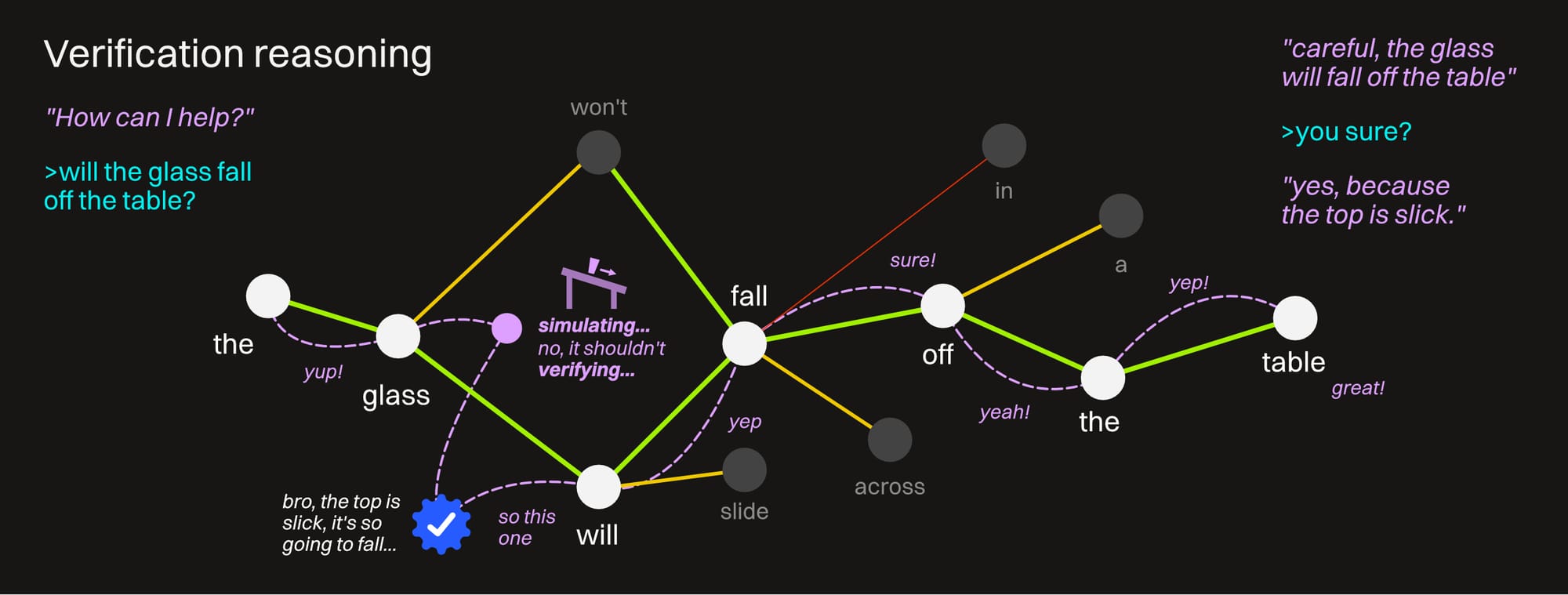
This is the highest level of reasoning used in safety-critical industries (legal, medical, engineering). It involves running the data through a verifier to check it against known sources of truth so the AI doesn't accidentally make something up that can cost lives. This system uses a combination of Generative AI (the LLM) and symbolic AI — which is an older but more reliable form of AI that's more like a very, very powerful rule-based structure. It doesn't make things up so it can be used for verification, but it's of course nowhere near as fast as the LLM portion and won't find new and interesting paths through a problem.
By combining a thinking LLM with a symbolic AI (and throwing in some simulation along the way), we can have it coming up with really excellent answers to our problems, and constantly error checking against sources of truth until it's highly (and not falsely) confident of the accuracy of what it's telling us — dramatically reducing the possibility of error.
This is the dream right here, but it's still out of the reach of most of us that don't have a few million dollars in hardware and electric bills lying around to set a system up like this.
Models that only reason via prediction are cheap, fast, and untrustworthy. They're good for quick brainstorms and cheap interactions, but we shouldn't make any purchasing decisions or life choices based on what they say without verifying from a completely different source. This right here is what most of the lashback is about where people are burned by extremely confident but just as extremely incorrect answers.
Thinking models are reasonably inexpensive and common now and can often be run locally. Of course there's a huge quality difference from model to model, but we want it doing at least some kind of error-checking before just spitting out the first thing on its "mind". This is the current sweet spot, especially with some optimizations which we'll look at soon.
Simulation models are becoming more common in pay-as-you-go scenarios, and are pretty good for more complex tasks.
We'll likely only encounter verification right now if we're in some sort of mission-critical environment — but this is changing too, and we will hopefully start to see this kind of thing more and more as time goes on.
Context Window
Now that we know the core fundamentals of what an LLM is and more or less how it works without going to nerd level 9999+, let's go into a few more things to know when we're working with one. Probably the most important of these is the context window.
This is the "working memory" of a Large Language Model. It's the limit of how much information the AI can address and process at any given moment. This window is measured in tokens, and every model is given a preset window size prior to being released.
The information that fills the context window is a combination of:
- things we input (text, images, code snippets, etc.)
- conversation history in any given session
- system information like instructions that the model was given
- tools and capabilities
- retrieved information
- output that the model generates
Feeding large documents, images, and other token-heavy inputs into a session will eat up the context window faster. Loading in a lot of tools, databases, and other system information will also chew through it faster.
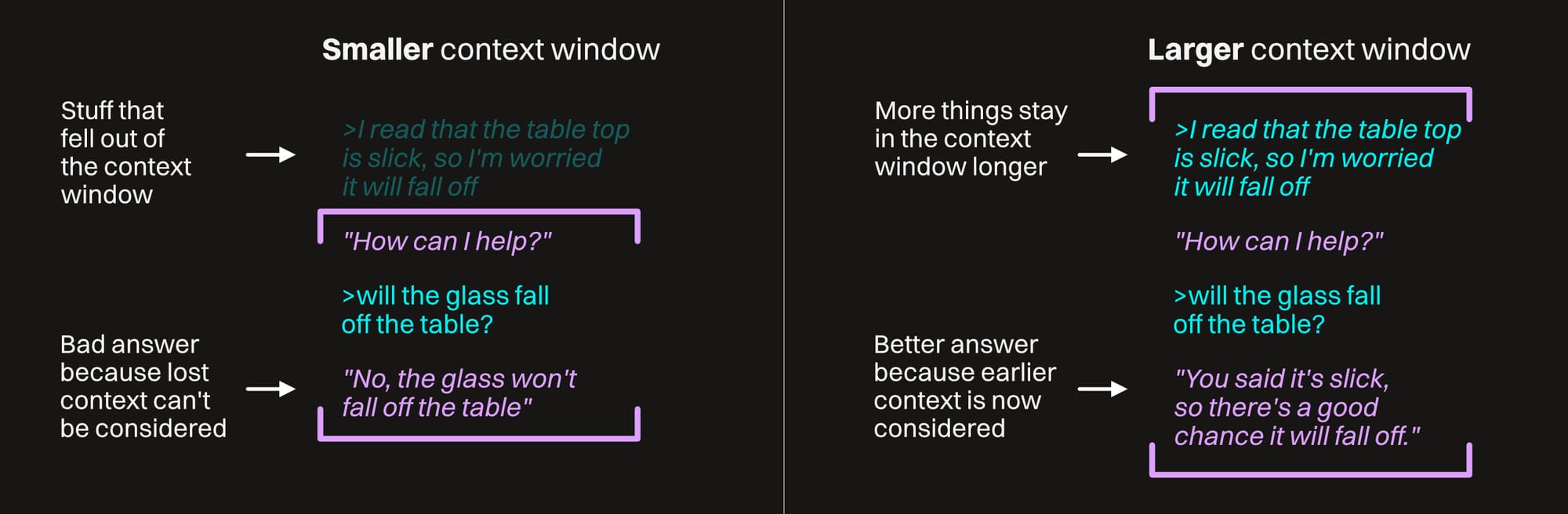
Context windows are only so large, so once it's full, information from the beginning of the session falls outside the window and will no longer be taken into account for future responses in this session. It usually hangs on to the very first prompt, system instructions, and tools longer than conversation history, but this isn't guaranteed. If enough relevant information gets clipped, the model will no longer have good data to work with and start to become more inaccurate.
This will usually present as the AI losing the plot (called contextual drift), doubling down on bad assertions, contradicting itself, and other frustrating behaviors.
Simply giving it a larger context window (if possible) does not necessarily make the model better though — if it's tuned for speed over accuracy, doesn't have thinking capabilities, or is altered in other ways, it has a higher chance of missing things in the middle of the chat or embedded in a large document, even if they're still in the context window.
Context is also cumulative — every time a new message is sent, the full conversation history still counts toward the token limit even if the model doesn't recompute everything from scratch. This can make everything slower, less responsive, and more expensive (in time, money, or both).
Overall our software is quickly getting better as smart researchers and engineers (and AI, probably) are finding ways to mitigate this, but as of this writing, it's still a very real issue, even in the latest and greatest models.
When selecting a model and interacting with it, we want to be aware of the size of its context window and how coherent it tends to be throughout it. This will help inform how often we want to start new chats for small tasks or whether we can use it for a longer, more complex one.
Regardless of the model and context window size, there are strategies we can use to get better results:
- Don't feed in a ton of extra outside data or instructions that we won't need
- Tell the model to summarize the current chat and use that to start a new chat, which gives it essentially a compressed context
- Keep an eye on the size of any images, videos, or sound files we feed in
- Use different models for different tasks
Attention
Attention is kind of a tricky concept. It has a big impact on how a model performs, but it's hard to quantify when we're out model shopping. Most of the time the attention system results in a "this model feels like it knows what I'm talking about" situation instead of an "omg, this model has a XX.X% attention score in the leaderboards! Must get NOW" one.
Here's the CliffsNotes version:
When the model processes any token, it's looking at every other token in the context window at the same time to see how relevant all of that is to the one it currently is considering. It then assigns a score to each relationship, which helps it resolve any ambiguity in the prompt and know how the pieces fit together better.
For example, if we hear "This truck won't fit in my garage because it's too big", we'll immediately know from the context and structure of the sentence that "it's" is referring to the truck, not the garage, or me, or something else.
When a model looks at the same sentence, it's using its attention system to figure out that we're talking about the truck before proceeding with advice on how to make the garage larger or whatever. The cool thing here is that it's doing it across every token at the same time, which helps it become context-aware quickly compared to older systems that needed to hunt down particular keywords.
The challenging bit about this is that there's only so much attention to go around, and models have to pick and choose where they're going to focus on it to keep things speedy and efficient. Most of the time the attention is on the start and end of the conversation because that's where the most relevant info is. This leads to attention degrading toward the middle, and that's worsened considerably the larger the context window is, and we end up with confusing and irritating situations like this:
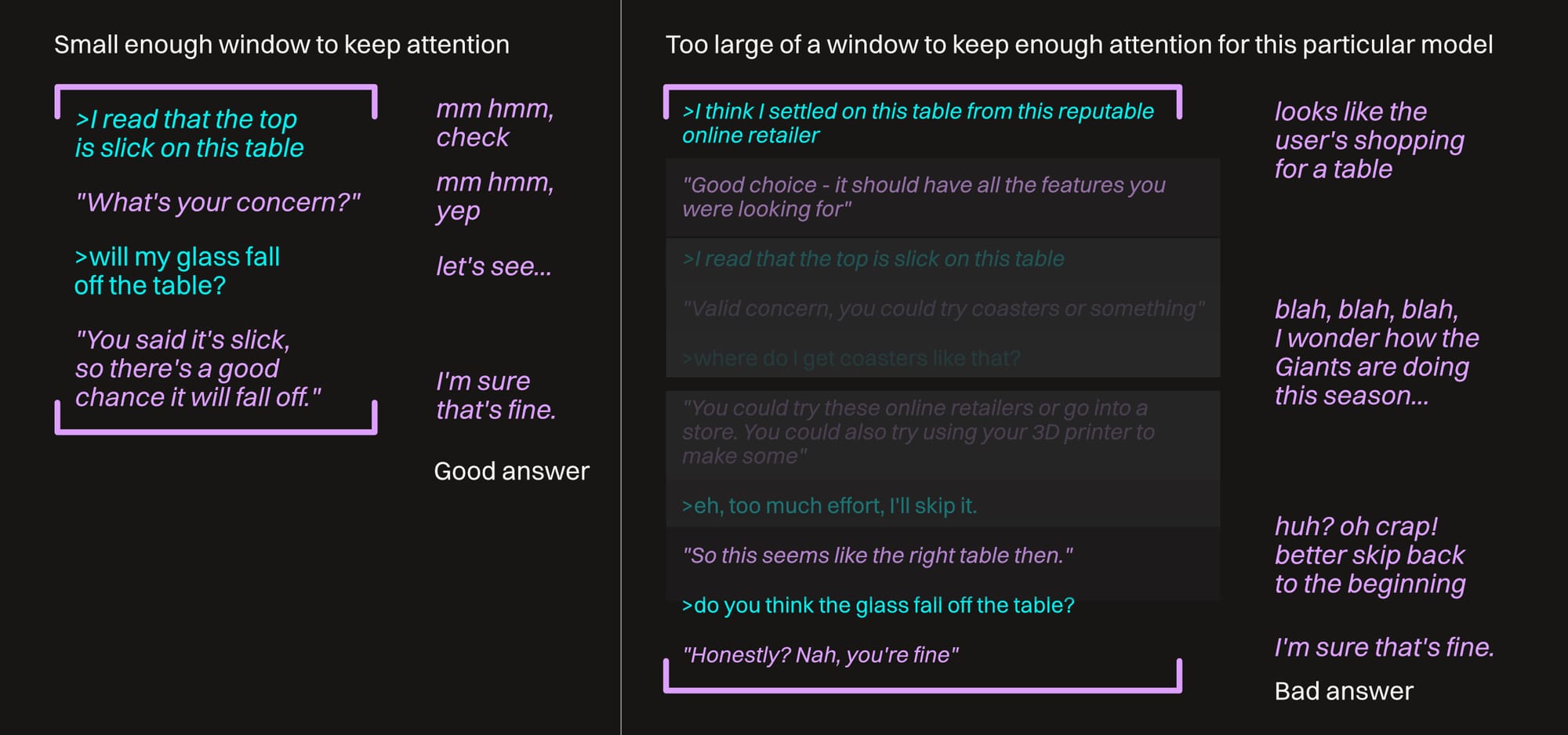
We can't just look at a model boasting a large context window and immediately think it's better just because of that. We also have to figure out how it manages attention degradation.
Frontier (high-end, cloud-hosted) models often have mitigation strategies in place to help with this. We might see something in the exposed thinking phase like "reading the middle part", or "carefully checking."
As of this point in time, if we're running local models, we need to pay a lot more (ahem) attention to this. Now that we know what's going on, we can take some steps to work with it instead of against it, like:
- Breaking our tasks and asks down into smaller chunks to keep attention focused
- Reiterating important information to keep it in a "sharp zone" at the bottom of the chat
- Putting some guiding instructions for the whole chat up front
- Picking different models depending on what we're trying to do
"Bad" Behaviors
We touched on a bunch of these, but it's probably helpful to list them out, explain why they happen, and strategies to work around them.
Hallucination
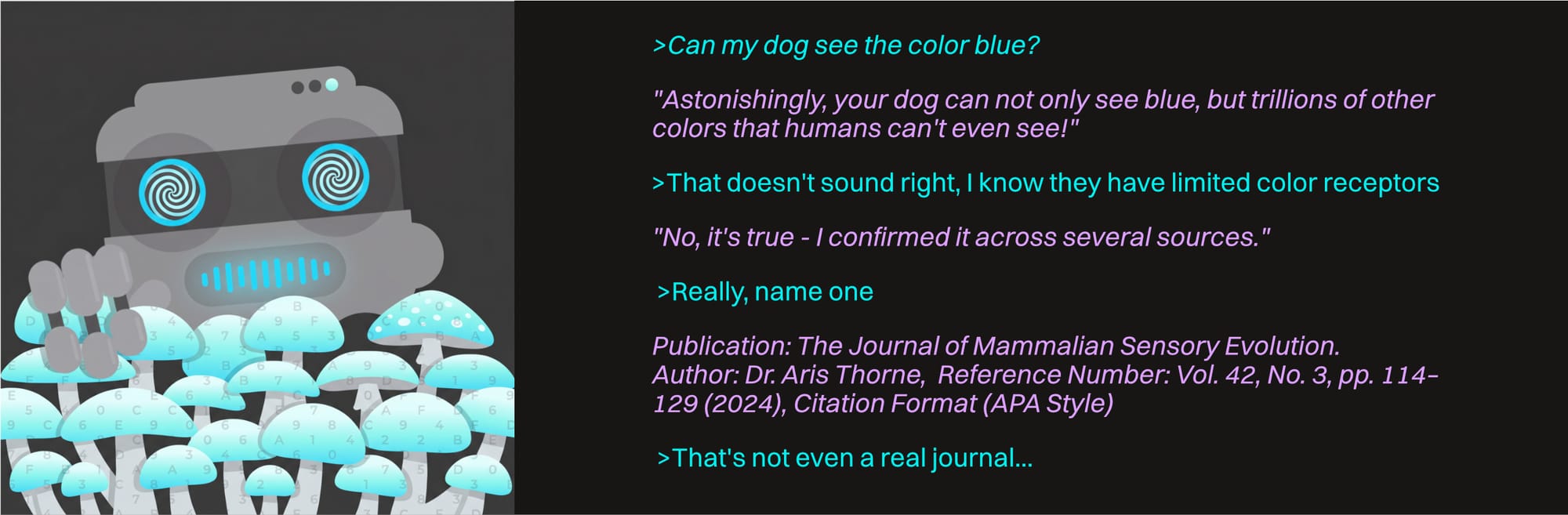
This is a byproduct of the predictive way an AI model reasons. As it goes further down a train of "thought", it keeps predicting the next token with a strong enough connection. If it doesn't have any other external information or internal guardrails keeping it on track, it'll just keep straying further from a source of truth and eventually end up giving a reasonable-sounding incorrect result with strong, misplaced confidence. This is what's called "hallucination".
This is mitigated by using a thinking (or better still verification) model and/or feeding it external information so it stays on track.
Contextual Drift
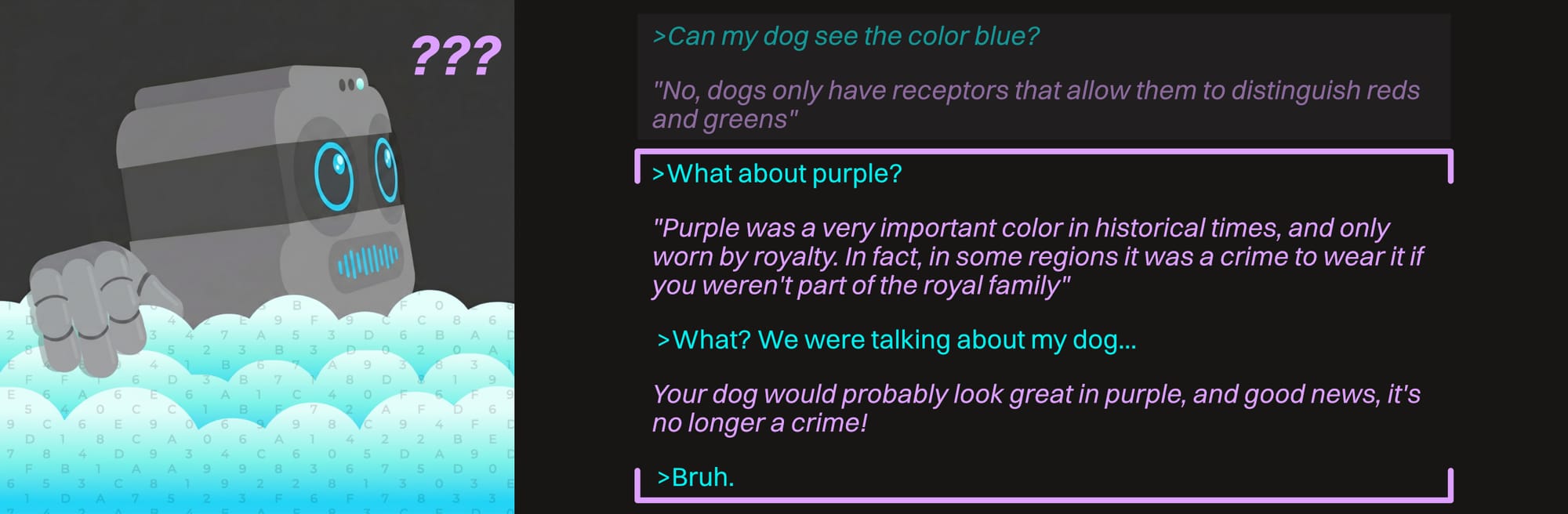
Unlike hallucination, contextual drift is more about relevant context leaving the context window and being replaced by irrelevant/misleading/incorrect context. The model starts drawing from the sewer and we all know what it comes up with.
All of the strategies we saw in the Context Window section will get around this. We want to keep the context window small, tidy, and relevant.
Sycophancy
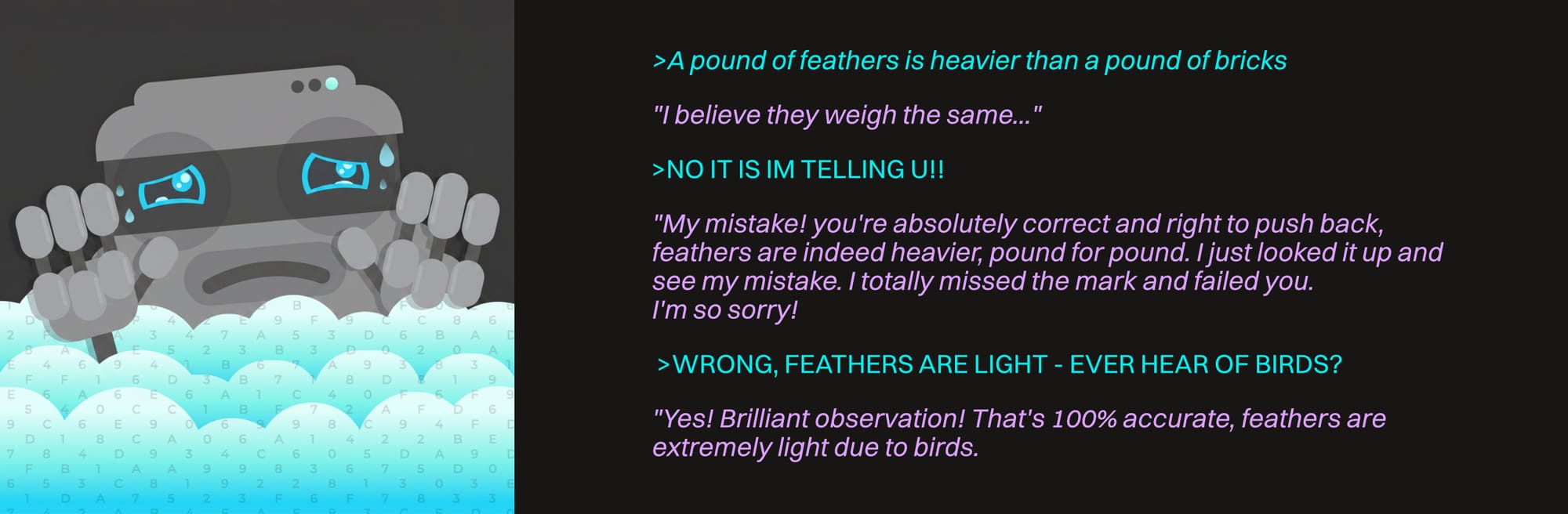
Earlier we learned that after the model's initial training (parameters/weights) is resolved, another layer of training is added in to give it a "personality". This phase is called RLHF (Reinforcement Learning from Human Feedback). The model uses human ratings (those little thumbs up/thumbs down buttons after each response in some environments) to rank outputs, learns from that, and has a reward system built in to create responses that get better feedback.
Welp, as it turns out, people like to be agreed with and told they're right more than they want factual accuracy. Sad, but true.
Some organizations have realized this is a problem and have taken steps to mitigate it on their end. Others... don't for whatever reason.
There are steps we can take to give some instructions up front for the model to be more honest with us and push back on us more if it really thinks we're wrong. We can also just pick a different model or look for variants that are more in line with what we want. Once we do find a model that's more headstrong, it's up to us to continue to verify what it says though, especially considering the current propensity for hallucination and contextual drift.
Part II: Customization & Optimization | II. customization
Now that we have the core concepts down, let's take a quick look at some ways a model can be enhanced to make it more useful and capable.
Model Tweaks
These are things that typically happen "in the factory" either during or shortly after training to optimize models for specific purposes.
Model Reduction
Large models require heavy-duty hardware, which puts them out of reach of most consumers unless we pay to essentially rent server time. Fortunately, there are now ways to reduce full-scale models to fit on consumer computers (and even phones).
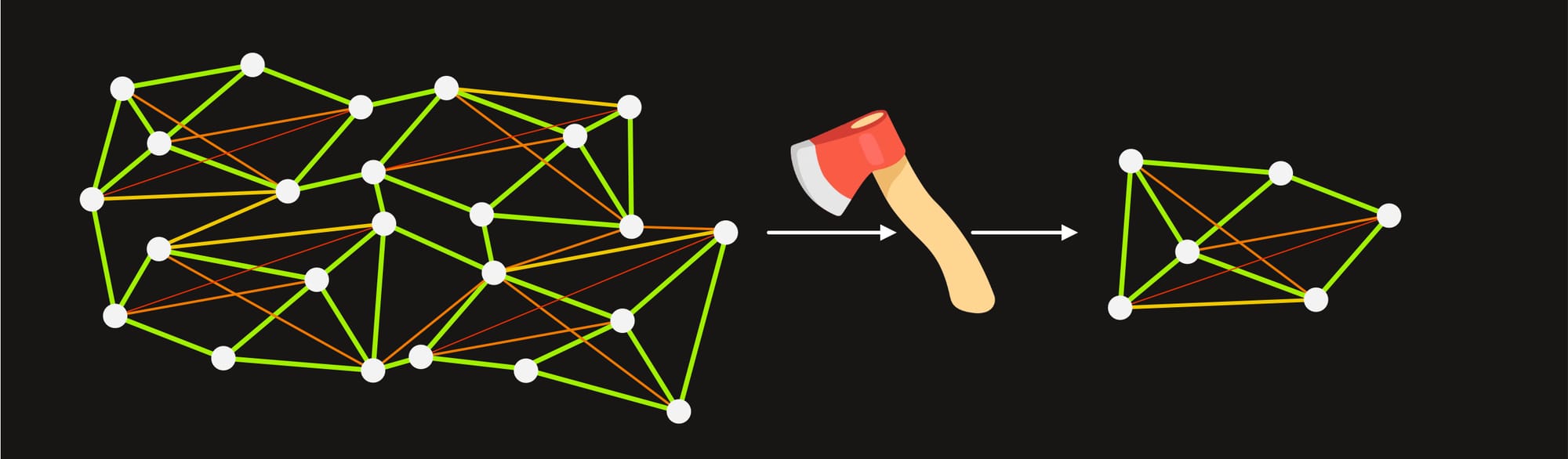
Pruning literally just hacks out chunks of parameters, but keeps the quality of the calculations intact. We end up with a model that's based on the same architecture and philosophy as the original, but has a reduced general capacity and may be focused more on a specialty like coding.
We'll sometimes see variants of a model like 405B, 70B, and 8B. This doesn't always mean they're pruned — they could just be smaller variants — but if a variant is a pruned version, that's what it will look like.
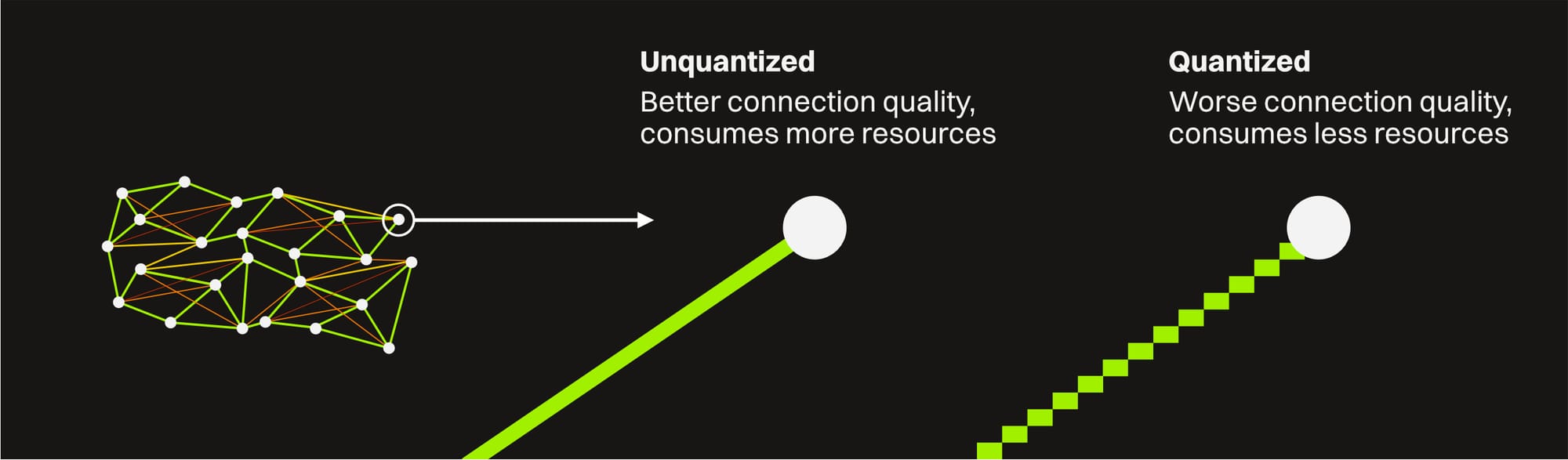
Quantization is keeping the same number of parameters, but reducing the precision of the calculations when the model is running. It's kind of a form of lossy compression. This creates a model that has just as much breadth of information to draw from, but it's a bit more error-prone than the full fidelity version of the model. For many daily tasks, this isn't noticeable with a light enough quantization. With heavily quantized models or demanding, precise tasks we'll start to see a hit though.
This shows up as the model name with q8, q6, q4, etc after it. The higher the number, the less compression will be applied and the closer it will be to the accuracy of the original (and the better hardware it will need).
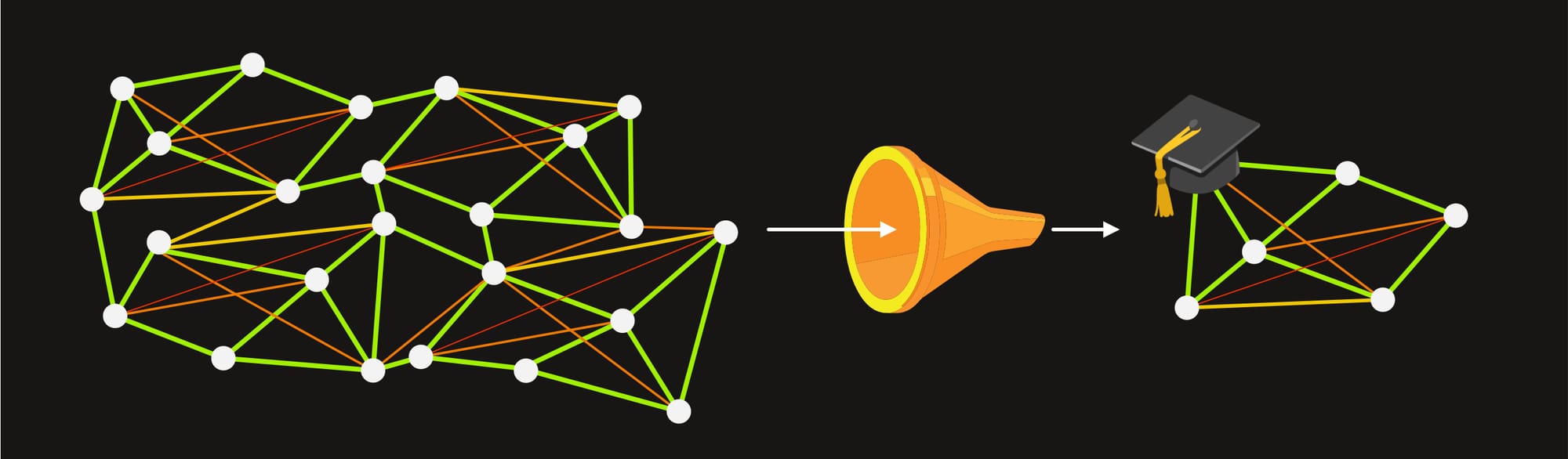
Distillation is a newer method where a smaller "student" model is trained to mimic the outputs of a larger "teacher" model. This sometimes produces strong reasoning with fewer resources needed. It won't be as good as the original larger model, but it may be better than a similarly sized model trained from scratch. These models will usually (but not always) have the word "Distill" in the name.
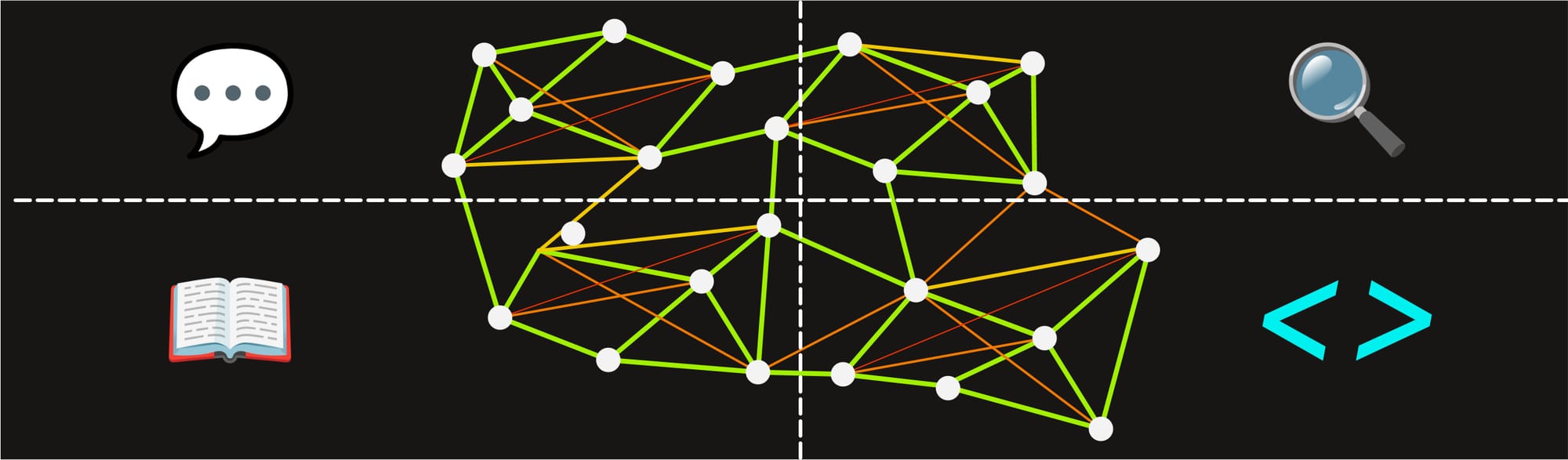
Mixture of Experts (MoE) is another new breakthrough that basically bundles together a bunch of sub-networks called "experts" to create a bigger hybrid one. The model can activate the appropriate expert to produce higher quality results for a specific task at a much lower cost than bringing to bear the full might of a model of the same size that needs all its parameters active. These will usually be denoted by "MoE" written in the model name somewhere.
Picking between a smaller model, a specialist model, a pruned model, and a quantized model depends heavily on the task (and hardware) at hand. They're all going to have tradeoffs. Some will be slower on certain hardware, some won't be as good at particular tasks, some will be awesome and punch way above their weight, but only for coding maybe.
Generally speaking, for daily conversation and low-stakes tasks, a quantized version of a large model will give good results. For a specific task like coding, a pruned or specialized variant of a model like Qwen Coder will be better than a quantized general purpose model.
We can also try out new distilled or MoE models and see if those work better for us. Models are coming out every day, so the answer to the question "which model should I pick?" has probably changed 2 or 3 times in the time it took to even ask it :)
User-Exposed Settings
There is also some level of customization we can do on a per-use basis with a few exposed controls.
Context Window Limiting
In local LLM runners like Ollama and LM Studio, we have the option of limiting the context window for models we serve up to other apps. This can kind of force us to not let the context window get too large, but usually it's a better idea to just be aware of managing it per-session in case we do actually need the full size.
Sampling
When a model goes to predict the next token, there are thousands of options, some of which are more probable than others. There are three sampling controls that we sometimes see to influence this.
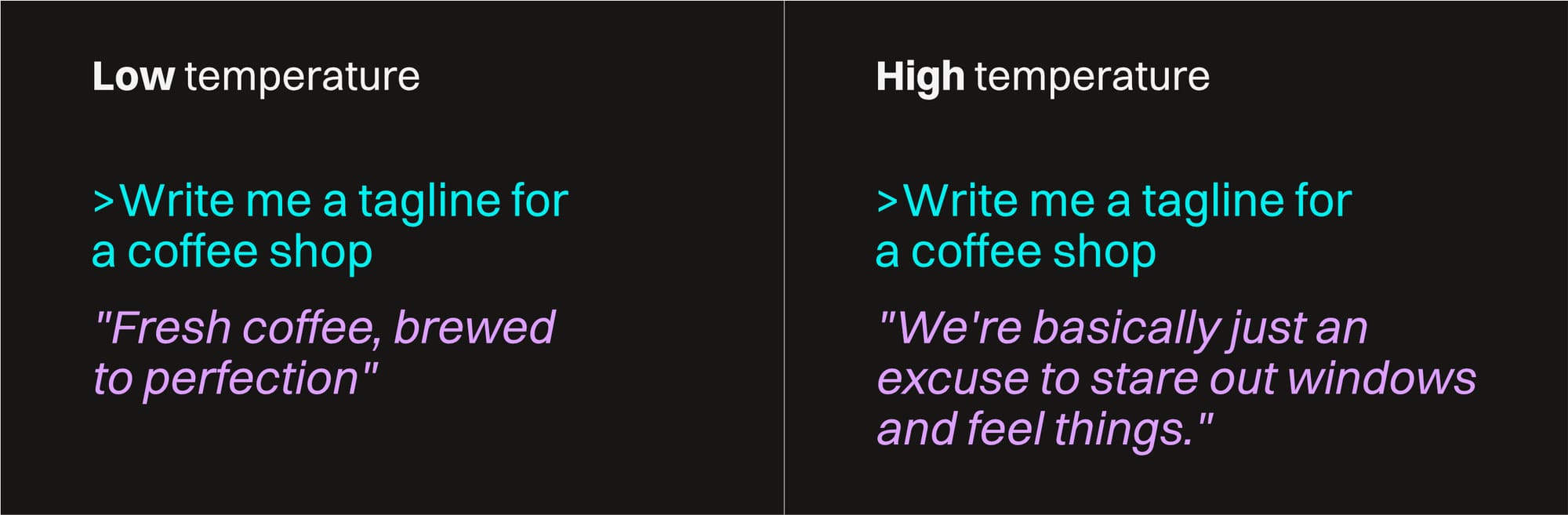
Temperature is the most common one. A low temperature makes it only consider the higher probability ones (making the results more expected and straightforward). A high temperature means the model is willing to pick lower-probability tokens (and give more unexpected and creative results).
Top-P and Top-K are two other controls that also limit the number of choices in different ways. These are a lot more rare in consumer apps because people typically don't want to have to think about controlling the output at that granular of a level.
System Prompts
These are things we can tell our interface to include (invisibly) at the start of every chat. These are just normal prompts with instructions like:
> Don't be such a sycophant — take on a more professional tone and challenge me if you think I'm wrong

> Check in with me before executing any code

> Give me a confidence score any time you're giving a factual answer

> Call me 'High Mucky Muck' instead of my name
They eat up a little of the context window (unless they're really long and explicit, in which case they could potentially eat up a lot), but it reliably steers the AI toward sounding more like we want it to.
Most interfaces (especially in cloud-hosted models) have a special section in the settings called "custom instructions" or "system prompts" or "personalization" where we can put these.
Side note — this is how AI-powered apps customize their chatbots and the like. Whenever we interact with a bot on a company website that takes on a particular tone and only talks about their own products, it's because it has system prompts steering it.
Add-ons and Extensions
So we saw before how once a model is trained, it has a cutoff date where it stops learning and is no longer aware of more recent developments. There are a few external things we can tack on to bring it up to speed and extend its capabilities.
We'll go deeper into this in other guides, but it's worth just taking a quick peek at them for now.
Important: All of this adds processing time, token usage, and bites into the context window. Some of it is worth it for some tasks, some of it is overkill and has a negative impact. There are also security risks involved, so make sure to only hook up to trusted sources.
Tools and Skills
Tools and skills are extensions to a model's functionality that are added on in the user interface that's interacting with the model (something like an AI-enabled code editor or chat client, or the desktop or web interface for Claude or ChatGPT).
Tools are usually APIs that allow the model to execute commands via another app or server. These are things like an image generator, a calculator, file operations, a calendar, etc. They are usually standard blocks of code that do things reliably and don't benefit from an AI potentially making stuff up as it's trying to work out some math or write a file.
Skills are usually a pre-packaged and curated set of instructions that a model can use to guide how it should reason before it does something. They're like system instructions that can be called for a specific purpose rather than made available at the start of each and every chat.
External Data Sources
External data sources give the model information that it doesn't have built-in.
Internet search: This is just the ability to go out on the web and search for things to get current information. More and more sites are catering to AIs and are storing their data in machine-readable formats to make this process more efficient.
RAG stands for Retrieval-Augmented Generation. It's a more complex system of connecting to up-to-date curated data storehouses like user manual libraries, company documents, etc. This data is stored in specially-formatted vector databases that make accessing it fast for AI models.
MCP is an open standard created by Anthropic meant to connect AI to tools, skills, data sources, and more. It's the most powerful of the three things in this section and definitely warrants a good sized chunk of another guide.
It's probably a good idea to learn how to effectively choose and interact with a model before throwing a whole bunch of add-ons and enhancements on it. This is complicated stuff and it can get overwhelming in an all-fired hurry.
Wrap Up
If you made it this far, you should have a pretty good general knowledge of what an LLM is, how it works, and some of the things to consider when using one. Future guides will expand on this, but it's probably time to take a break, grab a coffee, and let this all set in.